26 July, 2010

Axtell's Notes: July 26

Constant Q is working! Really. It even can be graphed. Here's some proof:


These aren't scaled correctly as Constant Q is logarithmic and I have been using the FFT grapher so we could see if we were getting any points back. I would have a screenshot of Maple Leaf Rag to show you, but at the pace these were taking, it seemed like a 2-minute song would have taken around 7 hours. I'll be running it tonight so tomorrow morning we can see that.

We have written the most common kernel for the CQT (min. frequency = 16.352 Hz, max. frequency = 22050.0 Hz, bins per octave = 12, sample rate = 44100.0) to a text file so the computer doesn't have to re-calculate it each time. If those values are changed (min/max frequency and bins are changeable in the advanced menu and the sample rate is given by the sound file) the kernel is calculated, but not written to a file.

Tomorrow's to do list:
-Adding windowing functions to CQT
-Getting the CQT data into a logarithmic scale
-General clean-up and testing

23 July, 2010

7/23/10 Daily Journal of AT

Hey, it's the end of the internship! Okay, not really, since we have at least one more week. But it could be.

The old version of everything is working. Axtell and Gregor are still playing with constant q, but we do have a working FFT with peak finder, beat analysis, note generation, and statistics data. And they don't generate errors (well, unless the file you give it is error-ridden, in which case, we can't help you). I finished off the grapher for the stats data as well. It prints the average, as well as the skew, standard deviation, and spread, with kurtosis as changing colors.

Next week: code clean up!

22 July, 2010

Axtell's Notes: July 22

That problem from yesterday (only graphing the first section of the spectrogram) is somewhere in the Audio object class and how we split the file into many samples of the given length. I've avoided the problem, and the DFT half of Transforms is working now, but I should try to find out what the problem was.

How we split without the Audio object: Make an AudioInputStream of the audio. Make a for loop that makes a mini AudioInputStream that is a sample size long section of the full stream. (The way AudioInputStream works, each time through it will start reading where it last stopped) Get the data from the mini stream and FFT that.

How we tried to split it with the Audio object: Make an Audio object of the audio. Get all the data from that object (in an array). Make a for loop that makes a mini array that is sample size long starting where the last one stopped.

How we're splitting now: Make and Audio object of the audio. Audio has a split () function that makes mini streams and gets the data from each of those and adds is all to a 2D double array. So it's a combination of the two.

I did some time trials with the old and new DFT classes and found that the new is slower, but it is only noticeable on files of a minute or more. CQT is still not working, but Gregor's working on that. The new DFT is also taking a lot more memory than the old. I had to boost the memory mac to 4096MB for it to run Sweet Caroline. The old DFT can run the same file with a max of 2048MB.

The whole morning and half the afternoon were spent on those two projects.

The rest of the day went to working on some null pointers that come up when running Buffet (formerly BigGUI). They happen because there is a listener in the filename textfield that should only listen when the enter key is pressed, but it isn't very easy to get Java to listen to an enter key. While these null pointer errors don't stop the program from running, they are annoying and distracting, so I'm going to get rid of them. I'm working on that, and it should be working by the end of tomorrow.

Tomorrow is all day pair programming to neaten/speed up/shorten/fix all the code and end up with one set of classes that we are all working with since we are all working with different code.

7/22/10 Daily Journal of AT

Today was statistics, statistics, statistics. I got a decent graph out of the stats data, and printed the average, along with three standard deviations, with no problems on several files. I then did a bit of research on skew, to better understand how to best represent it visually, and added in a writer for that. After an hour, I realized it wasn't the drawer that was making the skew far off from the average, but the original statistics data.

Initially, the average and standard deviation were solely on the heights of the data. While this worked fine, it provided useless when trying to find what the average frequency was. However, when trying to find the centroid (the average frequency based on heights), the resultant number is always the same, regardless of the file (silent files have the same average as noisy ones, which is clearly wrong).

I haven't even begun on kurtosis. However, it is good to know now that the data is wrong, and hopefully I can fix it tomorrow. The grapher is not as important, though may work as a replacement for NoteFinder.

21 July, 2010

Axtell's Notes: July 21

The DFT half of the Transforms class is kind of working. It doesn't return all the samples. It does the a440 file correctly, but the fade file shows only the fade up (not the fade down) even though it has the same number of samples shown as the old DFT. I've kept the old DFT working in a separate folder so I can keep updating rainbows and getting rid of spill.


The new DFT is also slowing than the old one. I haven't figured out why yet, but the dialog box that pops up and quacks on completion of the split now also prints the time it took to split and FFT the file. The new DFT is about twice as slow as the old.

The Constant Q still doesn't work. It will work for about ten minutes, and it does get numbers, but none of them get through PeakData, so after all that work the computer shows a blank spectrograph.

Gregor wasn't in today, but should be back in tomorrow afternoon so we'll look at this together and get that working by Friday hopefully.

That was more or less all I got done today as we were locked out of the lab for a while this morning. Lot's of slow and steady progress as we work towards getting the Constant Q working. We need to start looking at cleaning up, commenting and packaging all our code together this week.

20 July, 2010

Axtell's Notes: July 20

Everything has been moving so slowly that I haven't been bothering to type up all I tried that didn't work. I've been working on Threshold v. PeakData and cleaning up BigGUI (Now called Buffet). We're working with PeakData right now, though that's not perfect yet (Tayloe's been doing more work on that, so look at her posts for more information.)

More importantly, Gregor and I have been working on getting a java Constant Q Transform method and yesterday we finally got the same numbers as the MATLAB method. Today we spent all day putting her code (Complex, Audio, DFT and CQT) and my code together. I also did major clean up of BigGUI, FFTGUI, and the graphers. I'm starting to rename classes more useful, updated names (eg. GraphSplitter is now Spectrogram). I made a class Transforms that is a combination of DFT and CQT. We're not sure which will be best, so we made both, and we'll test as we go.

I just got everything compiled and tried running Buffet. The DFT plots some points, but they are clearly wrong:

The Constant Q doesn't return anything as of yet. I hope to get this working tomorrow morning, so I can get the grapher working with CQT data by the end of the day. I'll also be updating the menu to incorporate Constant Q.

7/20/10 Daily Journal of AT

This morning was spent in what I hoped was residual testing. However, I found out something weird. The scaling of the data affects what data is kept in the peak generation. At low multipliers, this can be based on some numbers being set to zero, so that, the lower the multiplier is, the less data is retained. However, a similar effect, though less dramatic, happens as numbers increase (as in, higher numbers return fewer peaks). The image below shows the same short sound file at multipliers of 1 through 12, counting from left to right, up to down.


As you can see, at the multiplier of 4, the most data is returned. This holds true for most files, regardless of overall loudness. We don't know why this is, but have compensated for it.

The afternoon was spent working on graphing the statistical data. Unfortunately, there are no pretty pictures to show from that, as I've only managed to get the data in and corrected, while the adapted GUI grapher is giving me trouble. It will possibly be replacing Note Finder when it's finished, as it seems a bit more useful.

19 July, 2010

7/18/10 Daily Journal of AT

Today was spent re-implimenting Peak Data. I know, I know, from all that I said before about Threshold being so great at cleaning data, this is unexpected. However, with the amount of testing done by myself and Axtell, it was clear that Threshold was cutting out hearable peaks in the upper frequencies, while leaving lower peaks that may or may not have existed. I've had to play with several aspects of the program, including getting rid of the equalizer. Oddly, it was changing the results of Peak Data, even though the function works on a relative scale. Fortunately, I've managed to get fairly consistantly accurate data on most of the windows with the same function (rectangular windowing remains the most messy).

In addition, I re-wrote Statistics so it just creates a file of the statistical data, rather than the FFT as well. The peak data is still being written to file, which is the most important part of the data. Tomorrow, I hope to move on to getting the constant Q to work with the other functions (have to change scaling for a lot of functions). I'm debating on abandoning the BPM finder, as it is not terribly accurate, has taken up a lot of time already, and may not be useful in the long run.

16 July, 2010

7/16/10 Daily Journal of AT

Hey, it's a blog! There hasn't been much to say for the past two days; it mostly related to testing and tweaking numbers of BeatFinder and Threshold. They're mostly stable now, so we should be set with that. I also created a statistics finder to go with the FFT, which works, but doesn't do much except for display numbers. At the professor's request, I added a method to write the statistical data, as well as all the FFT data, to a file. (I will add more about the statistical data soon.) On a four minute song, the data size is 2.4 GB. And I got an error message:


Next week: Making it smaller! Also, graphing statistical data.

13 July, 2010

7/13/10 Daily Journal of AT

Only worked with the bpm generator today. Started out writing a function to compare a generated bpm to beats found from a file. It worked, but not particularly helpfully. If the downbeats are correlated exactly, it's easy to tell if a file matches or not. If it is off by, say, an eighth note, then two identical beats will nonetheless return with no matches. It is possible to run and re-run matches to get the best data, but it takes up a lot of processing time and may not be necessary if the most occurring spaces is used by default. I've left the function in the program uncalled, for now.

After a few hours of testing, I discovered that my bpm generator was constantly getting laggy data. On a few songs, it was accurate, but on most, the beat it created was not the same as the beat in the song. I figured out that, the faster a song is, the less accurate the program can determine it's bpm. Why? Because of the spacing.

See, if I took every sample and tested if they were a beat, I would be able to tell exactly how far apart the beats are. However, in order to tell if they are a beat, I must take more than one sample at a time; in this case, 1024 samples. The relation of the spacing to the bpm is an inverse function, so the smaller the beat distances are, the larger the bpm discrepancies. For example, the program can accurately generate any bpm less than 80, give or take a beat. From 80 to 95, it skips two or more beats; any higher, and it skips more. By 151, it skips by ten, and above that is unhelpful.

However, I have a few plans to combat this. In cases where the bmp is not exactly spaced by sample size, the most occuring two (or top one and three) spacings should be next to each other, because sometimes the spacing is closest to one, and sometimes the other. Finding the average of the two will lead to a more accurate bpm. At least, that's the theory. As of right now, the only song I've had time to test it on has become more inaccurate. Tomorrow will be more testing to correct this.

Axtell's Notes: July 13

Today I finally got to all those things I'd said I'd fix about two weeks ago. When somethings scrolls, the units scroll too. When something zooms in, it no longer prints data points in the border. FFTGUI once again has a compare function, and now it can compare any number of windows. I updated the Readme and Help files and continued general cleanup of all files.

I also played with weightings. The advanced menu now has 4 options (A,B,C and C modified.) C modified should only be used when trying to get something like a cymbal crash or hand clap. Those sounds tend to not get found by FFTs because they have strange waves. The modification is simply lets quieter peaks be graphed. So in Shave and a Haircut the last note (a cymbal crash) is visible, but in Maple Leaf Rag almost all the inaudible spill is visible.

C-Weighting, in general, seems to be the best. A-Weighting seems to miss a lot of data. As an example, here's a file made by Tayloe. It's two tones fading in and out. It was made to test the color spectrum.

Rainbows are still being tweaked. I discovered that they weren't properly fading because when I had adjusted the scaling, I hadn't adjusted the colors. Oops. Also, as can be seen in the screen shots, instead of all peaks past a certain point being red, the highest peaks now go from red to magenta.

12 July, 2010

7/12/10 Daily Journal of AT

After a bit of a break, I'm back for the seventh week of the internship. Most of my work today was with Beat Finder. I got the data about as clean as it will ever be, relatively speaking, and moved on to finding the beats per minute of any given song.

Essentially, the BPM, or beats per minute, are a way of recording the tempo of a song, originally for use with a metronome. A moderately speedy song would have a BPM of 120, or contain 120 quarter notes per minute (or two a second). Slower songs have a lower BMP, and faster songs have a higher BPM.

The path to getting BPM from beat data is a bit complicated. First, the program starts with an array of beats and silences. Each point of data is equivalent to 1024 samples long. The program measures the space between each beat, and stores it in a new array. The array is sorted, then each of the lengths are translated into BPM (by being multiplied by their sample size (1024), divided by the number of samples per minute (44100*60), then inverted).

The frequency of each bpm is totaled, and put into another new array. Right now, the program finds the top three occurring BPMs, the average, and the average after outliers are removed. With the test files I've used, the most occurring and the second average tend to be the same number, so it is slightly redundant. However, if a song should change tempo, or has an irregular back beat, this extra data may become necessary.

Overall, this seems fairly accurate. However, when testing the BPM by creating a new beat file, it tended to lag in relation to the song. I'm going to try to fix this tomorrow, then move on to either fixing the file generator or moving on to a new feature.

Axtell's Notes: July 12

Today was a lot of testing of the weighting functions. I made a tester class that prints the curve of A-, B-, C- and my own tweaked weightings on top of each other in different colors so I could see what looked best. I've added a constant to both the B- and C- weightings to neaten them up, and I am playing with combining them to get more precise window. Here we have Maple Leaf Rag with each of the weightings:


There is almost no difference between the B-weighted and the B/C-weighted spectrogram.

I made the advanced menu so now the buffer size and weighting controls are less available unless you really want to change them. I, once again, updated the rainbows. I started to go through each class and clean up, comment, get rid of what's unnecessary, etc. I'll finish the clean up tomorrow and continue to play with the weightings. I also need to update the readme and help files.

09 July, 2010

Axtell's Notes: July 9

I started off with a project that I thought would take all day, but that was done before lunch; I switched everything from a 3D array to a HashTable of 2D arrays so that access would be faster. Most full length songs run in under a minute now. I also cleaned up the code quite a bit to get rid of warnings (mostly redundant casts and unchecked instances).

I then spent all day making a browse option, or trying to. It doesn't work as of yet. The idea is that you should be able to use any sound file from anywhere on the computer, so I'm making a window that is like any Open Document GUI. It shows the directory and you can open or collapse folders and select the desired file and use that one. There are two problems with this. First, it prints the whole pathname of each file or folder which makes it too long to practically read, but JTree names it using File.toString() so I need to find a way print only the end of the pathname. The other problem is that this only works once. If you click browse and chose a filename that works fine, but try to do it again without restarting the program and it gets NullPointerExceptions.

While showing the professor how the GUI works, I found why my code has been printing a lot less than it used to. Where I get the dB of the file, I've been multiplying by 0.775 instead of dividing. This hasn't been not on files such as a440 because 0.775 is close enough to 1 that it didn't make a difference. On full songs though, it was very noticeable.

I have several tasks for next week besides getting the browse feature working. I'm making an "advanced" menu where such variable as buffer size and which weighting equation is used can be changed. I'm updating the readme and help files. I'll be doing a lot of general cleanup to make everything neat.

I'd also like to scale the magnitudes so they are between 0 and 1, but this caused problems when I briefly tried this because too many values were too close to 0 and were discarded.

And, of course, some screenshots:


See you Monday.

08 July, 2010

Axtell's Notes: July 8

I got a bunch of small problems fixed today, finished up my window research and continued to write the readme and help files.

I finally figured out how to change the heap size! Excellent. When calling the GUI, instead of calling "java BigGUI" I now call "java -Xmx(heapsize)m BigGUI" I've been using 512 megabytes and haven't had an OutOfMemoryError all day.

Everything can now work with an .au, .aif, or .wav file now. I'm looking into getting it to work with .mp3's too, but I'm not sure how possible that is.

I reactivated NoteFinder. It had been commented out about a week ago to try and avoid the memory problems, and I then forgot where it had been commented out.

All the windows are scaled to the same range of points (magnitudes = 0-3.5).

Oh man, It's been a while since I've posted some screenshots. Here's Maple Leaf Rag with several different windows:

Unwindowed Maple Leaf Rag


Maple Leaf Rag - Gaussian


Maple Leaf Rag - Blackman


Maple Leaf Rag - Blackman-Harris

I seem to be missing a lot of bass notes from this. I'm going to look at a bunch of full-length songs tomorrow to find out what needs to be fixed. Also, ThunderIntro is still missing the claps, and ShaveAndAHaircut is missing the cymbal crash. I'm going to look into finding those tomorrow too.

Axtell's Notes: Windows

So I've been doing some research into windowing; which is better for what type of sound and so on. There is no window that is universally the best so, we have to decide what window to use depending on what information we want to get from a sound and what kind of sound it is. As a general rule, the more complicated a window is, the more accurate it is.

Some variables that we look at are:
-Highest side-lobe level; low levels reduce bias
-Worst-case processing loss; low levels increase detectability of peaks
-Quality of frequency resolution
-Amount of spectral leakage
-Amplitude Accuracy

Rectangular (none) has the highest side-lobe levels (~-13dB) and a lot of spectral leakage and very bad amplitude accuracy. It is best used with a transient (e.g. spoken word) shorter than the window or two close frequencies of almost equal amplitudes.

Bartlett also has high side-lobe levels and the leakage and amplitude accuracy is only a bit better.

Hanning and Hamming are good choices for a fast, general-purpose window. They have good frequency resolution, get rid of a fair amount of leakage and don't take forever to calculate. Hamming window is our current default.

Gaussian windows have the added benefit of a variable that adjusts the side-lobe level and processing loss to a point. It is best used with longer transients.

Flat-Top has very low processing loss so is best used when amplitude accuracy is important.

Blackman and 4-term Blackman-Harris are the best at reducing spectral leakage and also have good amplitude accuracy. They have very low side-lobe levels. They are best for general use when speed is not necessary. These have a tendency to push the memory over its limit right now which is why we don't use them for full length songs as often.

07 July, 2010

7/7/10 Daily Journal of AT

Well, did some more testing today, and managed to fix two of the things I wanted to.

First, when graphing the data generated by the FFT, lately the higher peaks have been lost (namely cymbal hits). This is more than an asthetic concern, as if those notes aren't graphed, it means they aren't being returned by the threshold cleaning function. I experimented with a few of the variables in there, and managed (in the Hamming window, at least) to get the cymbal hits in a few test files to show up. Amusingly, since the beat finder function gets the data before it's cleaned, it has no problem finding cymbal hits, so there were cases where there was a beat for no notes shown.

I didn't actually solve that problem, but with Axtell's new windows, I'm confident that they will take care of the problem. I also improved the beat finder so that it returns more accurate beats. Before, all beats were returned, and I was playing with returning no beats if one was found within a partial second of it (because it wasn't a new beat, mearly the old one continuing). Now, I've added a portion to the cleaner that checks to see if the previous bit was a beat or not. If it is, it is assumed that the beat is not a new one, and sets it to false. To see how this affects the two strong-beat songs:

Sweet Caroline (techno remix)


My Sharona (rock remix)


At top is the song, then the uncleaned beats. After that is beats cleaned by closeness (i.e. if they have a previous true, they're not a beat), beats cleaned by the .1 sec rule from yesterday, and then both cleanings together. They tend to compensate for each other's failings, so it will be kept as is.

With that, I can say that the Beat Finder is done. There is the option to add in cymbal finders, but all that takes is testing to find the correct band. I won't be in tomorrow or Friday, unfortunately, but when I get back, I plan on working on improving the threshold cleaner for the data.


Axtell's Notes: July 7

We made a lot of progress today. Everything is running about as fast as it did last week. This is because of two changes: first, I modified Gregor's FFT and bitReverse methods to work with a 2D array of doubles instead of Complex (we're now using that instead of Sonogram's code), and second, I moved getWindowed (the actual math of the windows) from the enum Window to FFT.

All the windows (none, Bartlett, Hamming, Hann, Gaussian, Blackman, Blackman-Harris and Flat-Top) are working now. The problem with Blackman-Harris and Flat-Top was that they need to use indexes -N/2 < i < N/2 (Where N is the number of samples and i is the index.) All the other windows use 0 < i < N. The windowed data also scales so that the highest point is always the same. This is so the colors and what prints is consistent.

I've been doing some research into which windows are best for which kinds of sound. Tomorrow's post will explain that once I've had a chance to compile all the information I've found.

We're running out of memory very often still. I've added a popup window to explain what's happened and to stop it from printing the error in the terminal, but we haven't found a way to fix it. It happens mostly with the Blackman-Harris window when running anything longer than ten seconds.

I've started writing the Read Me for the whole program and realised that we don't have a name for our program. For now we're calling it BUFFET (Big Useful Fast Fourier Epic Transform.) That is subject to change.

06 July, 2010

7/6/10 Daily Journal of AT

Well, I've got more to show for my efforts today, even if they're all in picture form.

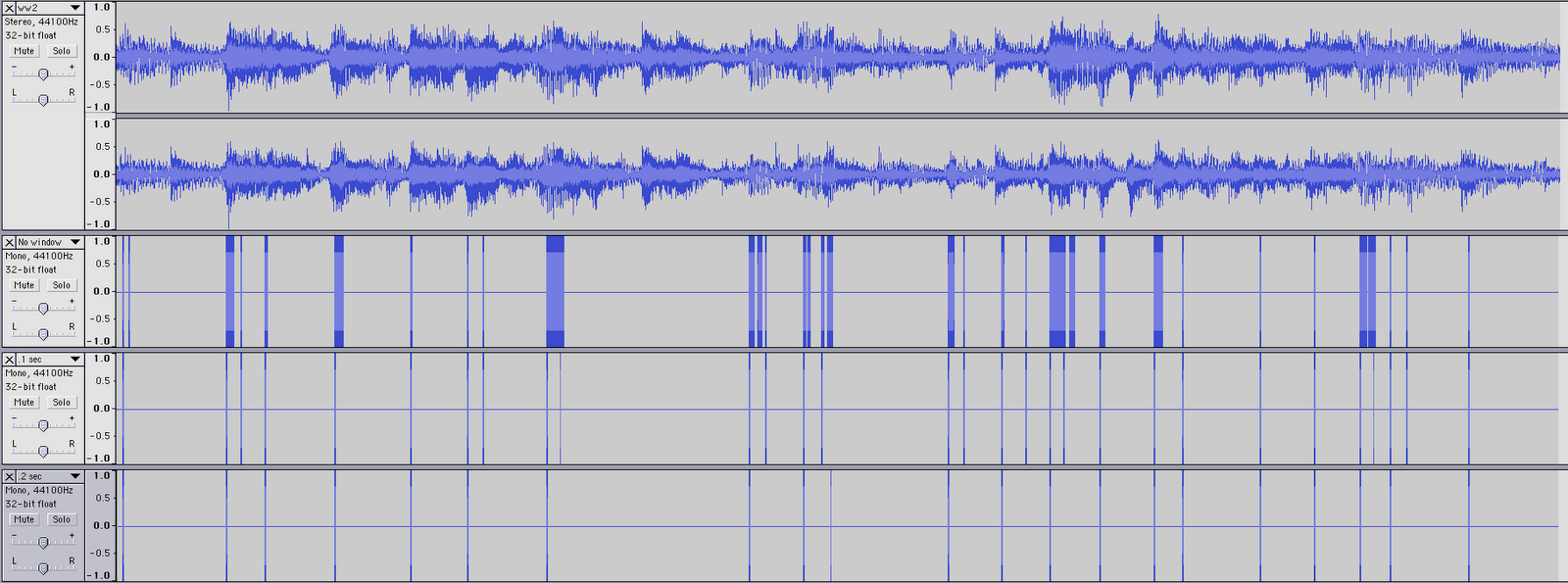
I started today by trying to get the BeatFinder to be more consistent. I ended up abandoning the function that finds the proper multiplier based on surrounding loudness, as it only ended up deleting all useful data. I decided on a base multiplier of 1.1 times the average as the threshold for a beat, as anything more started cutting out actual peaks. I stuck with base beats only today, and analyzed a few different songs. I also wrote a "cleaning" function for the beats. Basically, as it is now, if there is a hit on a base drum (or a really low base guitar note), the function registers it as a beat. It takes samples every portion of a second, so naturally, if one note lasts for a quarter not span, it will return a lot of "beats" in a row, rather than just one. I used four different songs (Sweet Caroline remix, My Sharona, Wild World, and Maple Leaf Rag) that had four different strengths of back beats (strong, moderate, weak, and none, respectively). I ran them with no cleaning, .1 second cleaning, and .2 second cleaning. These are the results:

Sweet Caroline (techno remix)


My Sharona (acordian rock remix)


Wild World (original country)


Maple Leaf Rag (piano only)

Looking at them through Audacity, it becomes much easier to see and compare how each cleaning function is doing. At the top of each image is the sample of the song being played, then the uncleaned beats, the .1 sec cleaned beats, and the .2 second cleaned beats.

With the steady techno beat, no beats are lost in the .2 sec cleaning, and the .1 cleaning leaves them messier than they should be (if we want one beat in the file for each actual beat). However, such a rigourous cleaning causes the rock song to lose notes. With the slower country, it's not as apparent either way, and the acoustic piano shouldn't bet getting very strong peaks (it probably has a few from low notes, resonance, and a bit of spill). In any event, depending on which kind of music is being analyzed (namely, slow or fast, loud or soft) would determine which cleaner would be more useful. As the computer should be (eventually) able to decide this on it's own when running the program, I left the second length as a changable variable.

In other news, the power briefly went out today. Fortunately, I saved recently enough that no work was lost.

Daily Blog 7

Today I spent the day trying to further decipher the constant Q transform. I looked at Judy Brown's MatLab code for the "brute force" method of calculating the CQT. I tried to translate it into java but the translation proved more difficult than I originally thought so I decided to re-read her paper on an efficient algorithm to calculate the CQT.

I had a little more success with understanding the CQT by re-reading the paper. I think I have a good idea of what the transform does and what variables are used to calculate the transform. Tomorrow I plan on trying to get a working program to calculate the spectral kernel for the transform. After calculating the spectral kernel, the CQT is found through a simple multiplication.