Showing posts with label tuesday. Show all posts

20 July, 2010

7/20/10 Daily Journal of AT

This morning was spent in what I hoped was residual testing. However, I found out something weird. The scaling of the data affects what data is kept in the peak generation. At low multipliers, this can be based on some numbers being set to zero, so that, the lower the multiplier is, the less data is retained. However, a similar effect, though less dramatic, happens as numbers increase (as in, higher numbers return fewer peaks). The image below shows the same short sound file at multipliers of 1 through 12, counting from left to right, up to down.


As you can see, at the multiplier of 4, the most data is returned. This holds true for most files, regardless of overall loudness. We don't know why this is, but have compensated for it.

The afternoon was spent working on graphing the statistical data. Unfortunately, there are no pretty pictures to show from that, as I've only managed to get the data in and corrected, while the adapted GUI grapher is giving me trouble. It will possibly be replacing Note Finder when it's finished, as it seems a bit more useful.

13 July, 2010

7/13/10 Daily Journal of AT

Only worked with the bpm generator today. Started out writing a function to compare a generated bpm to beats found from a file. It worked, but not particularly helpfully. If the downbeats are correlated exactly, it's easy to tell if a file matches or not. If it is off by, say, an eighth note, then two identical beats will nonetheless return with no matches. It is possible to run and re-run matches to get the best data, but it takes up a lot of processing time and may not be necessary if the most occurring spaces is used by default. I've left the function in the program uncalled, for now.

After a few hours of testing, I discovered that my bpm generator was constantly getting laggy data. On a few songs, it was accurate, but on most, the beat it created was not the same as the beat in the song. I figured out that, the faster a song is, the less accurate the program can determine it's bpm. Why? Because of the spacing.

See, if I took every sample and tested if they were a beat, I would be able to tell exactly how far apart the beats are. However, in order to tell if they are a beat, I must take more than one sample at a time; in this case, 1024 samples. The relation of the spacing to the bpm is an inverse function, so the smaller the beat distances are, the larger the bpm discrepancies. For example, the program can accurately generate any bpm less than 80, give or take a beat. From 80 to 95, it skips two or more beats; any higher, and it skips more. By 151, it skips by ten, and above that is unhelpful.

However, I have a few plans to combat this. In cases where the bmp is not exactly spaced by sample size, the most occuring two (or top one and three) spacings should be next to each other, because sometimes the spacing is closest to one, and sometimes the other. Finding the average of the two will lead to a more accurate bpm. At least, that's the theory. As of right now, the only song I've had time to test it on has become more inaccurate. Tomorrow will be more testing to correct this.

06 July, 2010

7/6/10 Daily Journal of AT

Well, I've got more to show for my efforts today, even if they're all in picture form.

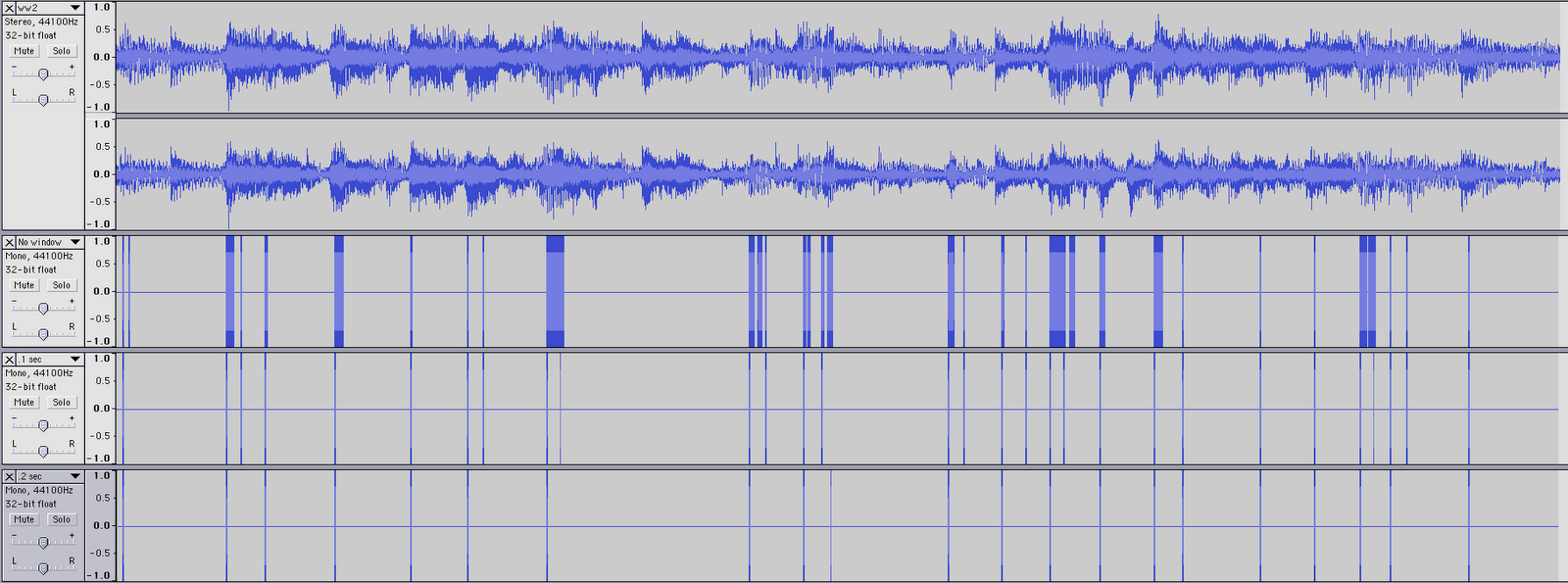
I started today by trying to get the BeatFinder to be more consistent. I ended up abandoning the function that finds the proper multiplier based on surrounding loudness, as it only ended up deleting all useful data. I decided on a base multiplier of 1.1 times the average as the threshold for a beat, as anything more started cutting out actual peaks. I stuck with base beats only today, and analyzed a few different songs. I also wrote a "cleaning" function for the beats. Basically, as it is now, if there is a hit on a base drum (or a really low base guitar note), the function registers it as a beat. It takes samples every portion of a second, so naturally, if one note lasts for a quarter not span, it will return a lot of "beats" in a row, rather than just one. I used four different songs (Sweet Caroline remix, My Sharona, Wild World, and Maple Leaf Rag) that had four different strengths of back beats (strong, moderate, weak, and none, respectively). I ran them with no cleaning, .1 second cleaning, and .2 second cleaning. These are the results:

Sweet Caroline (techno remix)


My Sharona (acordian rock remix)


Wild World (original country)


Maple Leaf Rag (piano only)

Looking at them through Audacity, it becomes much easier to see and compare how each cleaning function is doing. At the top of each image is the sample of the song being played, then the uncleaned beats, the .1 sec cleaned beats, and the .2 second cleaned beats.

With the steady techno beat, no beats are lost in the .2 sec cleaning, and the .1 cleaning leaves them messier than they should be (if we want one beat in the file for each actual beat). However, such a rigourous cleaning causes the rock song to lose notes. With the slower country, it's not as apparent either way, and the acoustic piano shouldn't bet getting very strong peaks (it probably has a few from low notes, resonance, and a bit of spill). In any event, depending on which kind of music is being analyzed (namely, slow or fast, loud or soft) would determine which cleaner would be more useful. As the computer should be (eventually) able to decide this on it's own when running the program, I left the second length as a changable variable.

In other news, the power briefly went out today. Fortunately, I saved recently enough that no work was lost.

29 June, 2010

6/29/10 Daily Journal of AT

Got it working again! Beat Finder will now run with both a basic file and on an FFT. Took most of the day to get it working properly, and there's still more to go. That's good, though, because most of what's left is finding the frequencies corresponding to various beat sources, like bass drums, hi hats, snares, bongos, tamborines, cowbells, and general frequencies. It'd be cool to have user options to specify this sort of thing, or analyze it to have the program tell itself which one to run. However, that's a bit more long-term.

This morning, I figured out the null pointer error that was causing my try to become a catch and return with an empty array. It was going a bit too far in the file, and couldn't fill the array. Fixed that with a simple -1, then moved on to getting the FFT to play nice. I ended up reinstating the FFT writer, but instead of having it in FFT, it's in WaveSplitter. That way, the data from all the miniwaves can be added.

Getting it back from the file was a lot harder. (It's impossible to just pass it, because there's not enough memory space.) The function ended up to be similar to what's done in NoteFinder, but with lots of extra for loops. (It's not terribly efficient yet.) Basically, the FFT file consists of all the miniwaves samples, and all the hertzs and heights in each. It's similar to what's in the peak data, but containing everything, so it's a much larger file and takes a lot longer to go through. (On the plus side, for anything else we need FFT data for, we have, and PeakFinder/NoteFinder may be re-done to reflect this.)

The function for getting the peaks at all samples (the chunks from yesterday) at a given frequency goes like this: Inside a while loop to check that there's more to be read, it goes past the number equal to the frequency, saves the frequency to a linked list, then goes through the rest until it reaches a double blank line. Then, it does it all again, until the file is empty. The list is made into an array and returned. That data is then used in the beat finder.

Next up is getting multiple frequencies at once, which will be harder, as the options are (A) run the data getter multiple times, which will save space, but take up a lot of processor time, or (B) change the data getter to get more than one frequency, which will be faster, but take up more space and be much more complicated in terms of coding. I'm inclined to go with the first, as I may be able to figure out how to optimize the speed, and it's easier to do that way first.

Also, the Beat Finder will also function as a single note identification program. Basically, right now it can find the peak frequencies of any note and return them. So if, for example, someone wanted to find all instances of E2 in a song...

...it's hard to imagine circumstances that would require it, but we can do it! (In this case, it corresponds to the back beat of a drum set.)

22 June, 2010

6/22/10 Daily Journal of AT

Ha-haa! I finally fixed NoteFinder! It took all day, but I managed it!

Basically, as I had it, it was finding the notes relatively well, but it kept going sharp. I played with a few methods of getting the notes, and went back to my original method, taking a range between two adjacent notes. I also thought to print out what hertz my program had for each note. I found that, since the base notes were only accurate for two decimal points, the higher notes were getting further and further away from what they should be. (Only the A notes were accurate, due to their strange even nature.) So, I went in and put the actual function for finding the hertz for the notes, so that they were accurate to more places initially, and kept accuracy over numerous multiplications. For information, the function is
6.875 x 2 ^ ( ( 3 + midi-pitch-of-the-note ) / 12 ).

That was fine, but when I checked the ranges, they were now overlapping! I had to go in and find the correct fraction to subtract from each range, which was rather difficult, as it had to be accurate to at least ten places, and I couldn't figure out a formula that would work for generating most from some! It looked linear, but not quite. Same with quadratic, squared, cubed, square root, all of them slightly off. Maybe there's a logarithmic function (knowing this program, there would be) but in the end I did it manually, which took a while, but increased accuracy immensely. Any spill now is from actual FFT noise, and nothing to do with NoteFinder!

15 June, 2010

6/15/10 Daily Journal of AT

So I figured out the problem from yesterday. I had created my files with a low amplitude (.1), in case I decided to add them together. However, at that low, the peaks are lost entirely in our FFT. At an amplitude of 1, they give a much different peak. (I should have guess when the waving occurred.) *sigh*

So I ran the numbers again, with a higher amplitude and shorter length (ten times as loud, but four percent of the length). Because it was so short, there was no data available for frequencies below 40 Hz. However, the ratio is now what was expected, half the sampling rate (44.1 kHz) over on fourth the buffer size (8192). Well, more or less. Annoyingly, this means at the very large buffer size of 32768, there are 2.691650390625 Hz per array. If I wanted to reduce it, get closer to (at least) a 1:1 ratio, we'd have to quadruple the buffer size (to 131072) which would drastically increase the time it takes to run the FFT. Potentially, we could merely double the buffer size, and have the ratio be at 1.3:1, which would allow us to at least tell the difference between lower notes (C1 and lower).

After all that, I made a function to figure out, based on frequency, what note was at the peak. It took a little figuring, but I managed to create it and then improve it. Initially, I had thought to use if/elif statements, but realized that would be a lot of code. Instead, I used a shortcut. I put the frequencies for the lowest scale (Ab0 to G0) into an array called basicNotes, with the corresponding letter value in literalNotes. I also put the distance between each element into another array (that was one longer) called basicRanges. The program takes an array of floats, presumably frequencies. For each one, it first figures out what scale it's in by testing to see if it's greater than the C of that scale, using a for loop. In a new for loop, it tests against each of the basic notes, multiplied by 2^scale (because notes are logarithmic), and returns the note that it's closest to (based on threshold between notes. Right now it's in half, which probably isn't exactly right, but it's close enough for jazz.) I had thought to store all this in one array, but Java requires them all to be the same, so I split them into floats and strings.

The rest of the day was spent testing different files to see how high their frequency peaks were, to try and get a ballpark range for the filtering; and testing the note finder. The latter is going better. Tomorrow will be cleaning up the files so that they play nice with Axtell's GUI, and trying to find a rule of thumb for getting the higher peaks.

P.S. For the test file we were given, the peaks are (approximately) at 292.0, 585.4, 522.2, and 259.7. In note terms, they are D4, C5, D5, and C4, respectively. As analyzed in thirds, the first two notes are D4 and C5, second two are D4 and D5, third two are C4 and C5.

08 June, 2010

6/8/10 Daily Journal of AT

Unfortunately, most of today was spent debugging with little to show for it, except for how not to do things.

Started out with a copy of Axtell's code from yesterday, an FFT function and a graph-drawing function, uncommented. Initially, we both thought that, since the imaginary in an FFT starts as an empty (or all zeroed) array unless a reverse FFT was being done, we could do away with it. I did so in my version. Then I started work on splitting audio files into portions, then analyzing them. This led to the morning of endless debugging.

First, I reasoned that the file gives the information of the number of samples per second, or srate. So, if I wanted to take a one-second sample of the song, I would get srate bytes from a file. If I wanted half a second, I would get half that many. So, I ran a loop to get all the samples, and copy them a portion at a time into a temporary array, then run an FFT on the array and store the data. I realized early on that the song samples do not tend to end exactly on the second, so I added an exception to write the data as zeroes if the loop was trying to copy samples that didn't exist. However, I was still stuck, as every time I tried to run the program, I got a Null Pointer Exception, not within the copying loop, where I almost expected it, but in the FFT function.

After messing with the various variables and becoming very confunsed, I asked Axtell what normally caused this problem. Apparently, if the number of samples is fewer than the srate, the FFT function won't compute. I still don't know why, because as far as I can tell, the function never uses the srate, but I adjusted the loop so that it only used audio samples of srate length or longer. I finally ran the function and printed the graph of the data...to see a mess. I tried zooming in and out, adjusting the window, printing only one graph at a time, still, nothing useful. Then I put the imaginary numbers back in.

Apparently they do do something, as that fixed the problem for the first graph generated. Unfortunately, all subsequent graphs, rather than having peaks in a few places, showed striking similarities to a sin wave. I thought the problem might be the imaginary number file, which was a global variable and never got reset back to zero. Doing that helped, but I still got a wave rather than peaks. I'm still trying to figure that one out, but I have a feeling it has something to do with all the global variables in that function.

The plan for tomorrow is to bypass all this mess. Rather than writing a function to split the sound file within the FFT function, I'm going to write a separate class to split a sound file into half-second (or so) increments, then run each of the resulting files through the FFT. Problems I forsee include having to figure out Java's AudioReader class, which confused me greatly before, or using BufferedReader, which lead to a loss of aliasing, or something syntactically similar. However, Gregor is starting work on getting the wave-byte-wave function working, which would solve that problem. Either way, I should have at least a function to show by tomorrow for my work these past two days.


Related minor issues: Our FFT will not read any music file longer than ~15 seconds. This is a problem, as the function should ultimately analyze full-length songs, but may be solved with the function I'm trying to write. The Hanning window is not working, and no windows are working consistently (Hamming only works for Axtell, and Barlett only worked on half my files). Sample rates need to be really large, as in 16K, for the FFT, because it's only at that level that the minor waves become noticeable above the noise (discovered when creating test files in Audacity).

Interesting notes: In music, whole notes can last anywhere from a second to ten, depending on the tempo. While the written values do not change, the speed at which they're played does. This means that, depending on the song, a second could contain a flurry of pitches or just one, and it cannot necessarily be told in advance based on the sheet music. Ideally, I'd like to analyze each note, but due to not only the variance in notes but in their length from song to song, this would be impossible.